

How can you use your new items?
Log on in-game and wait for the purchase to process - you'll receive a message in chat when this occurs. To put your new hat on, simply type /hats. Your Hats GUI will open and from there, you can select your new hat. To take your hat off, open your inventory and click on the hat in your helmet slot.
Want to try these hats out in-game?
Log on in-game and type /me and then click on the In-Game Store button. You can then visit Madame Texere's and right-click her to open a GUI containing every hat we sell on the store. Select the Golden Deer Mask, Sandy Hare Mask, Shadow Fox Mask, or Azure Butterfly Mask to see what these hats would look like on you!
This bundle includes four hats:
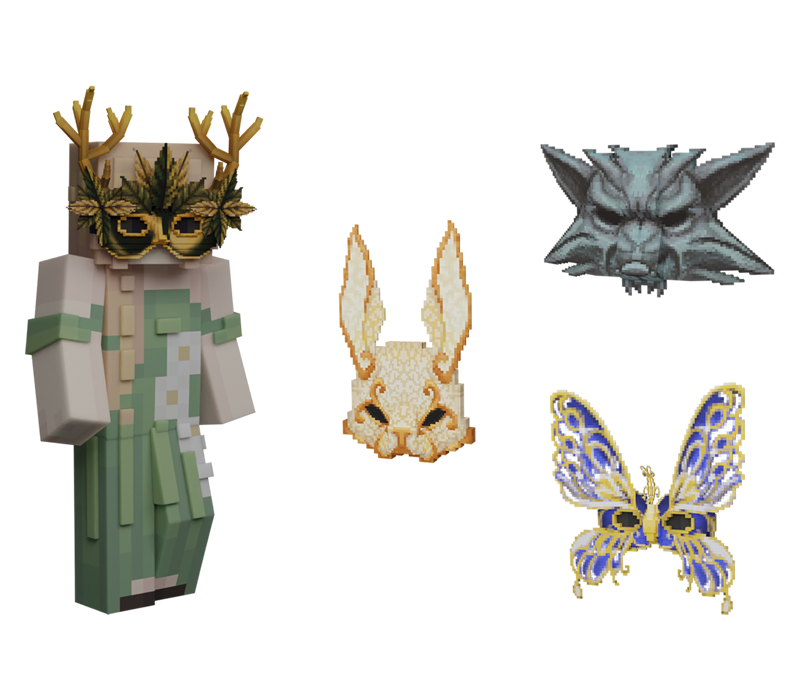
Models by: Droobledore (Sandy Hare Mask & Shadow Fox Mask) & Prin_ce (Golden Deer Mask & Azure Butterfly Mask)
Icon by: heyitslena
Renders by: Prin_ce (Sandy Hare Mask, Shadow Fox Mask, & Azure Butterfly Mask) & Lukeius (Golden Deer Mask)
Visual by: heyitslena